
Office growth is often treated as a hiring, leasing, or software challenge. However, the real limitation may be hidden behind the walls. A structured cabling system designed only for opening day can make it difficult to add employees, install new devices, improve Wi-Fi, or expand into new areas.
Since 1981, TELECO has helped organizations build dependable technology environments that support both daily operations and long-term growth. A properly designed structured cabling system creates a reliable foundation for data, voice, video, security, and other connected technologies. Poor planning can lead to repeated service calls, longer outages, and costly rework.
Key Takeaways
- Structured cabling should be planned for future users, devices, and technology—not only current needs.
- Clear labels, test results, and updated documentation make troubleshooting and office changes faster.
- Wireless access points, Power over Ethernet devices, racks, closets, and pathways all require adequate capacity.
- Cat6, Cat6A, fiber, and copper serve different purposes, so cable selection should reflect the site’s performance needs and expected lifespan.
- Recurring failures, overcrowded pathways, and unreliable documentation may signal that it is time to upgrade instead of applying another temporary repair.
What structured cabling matters for a growing office
Structured cabling is the organized copper and fiber infrastructure that carries data, voice, and video throughout a building. It supports much more than computers. Modern offices rely on cabling for business phone systems, wireless access points, printers, conference room technology, InVid AI video surveillance, access control, and other network-connected devices.
A standards-based system makes it easier to add workstations, relocate departments, replace switches, and introduce new technology. When cables are poorly organized or undocumented, even a simple change can require hours of tracing and testing. That extra work increases labor costs and can interrupt normal business operations.
Seven Structured Cabling Mistakes to Avoid
1. Treating Cabling as a One-Time Installation
One of the most common structured cabling mistakes is designing the system around the current office layout alone. Workspaces change. Teams grow, departments move, and new devices are added. A design with no spare ports, pathways, or rack capacity can quickly become difficult and expensive to manage.
A growth-ready cabling plan considers how the building may be used over the next three to seven years. It should allow for reasonable expansion without requiring major demolition or a complete redesign.
2. Planning Only for the Current Number of Employees
Counting desks is not enough. Each employee may use a computer, IP phone, docking station, or other connected equipment. Shared spaces may also require conference room systems, printers, cameras, access control devices, and wireless access points.
Before installation, estimate future headcount and identify areas that may be reconfigured. Include spare data drops and available switch capacity where growth is likely. A modest amount of additional capacity during the original installation is usually easier to manage than adding cables after walls, ceilings, and furniture are complete.
3. Selecting Cable Based Only on Today’s Speed
Choosing the least expensive cable that supports current demand may create an early upgrade problem. Cable category should be selected according to network speed, distance, interference, Power over Ethernet requirements, expected equipment upgrades, and the planned life of the facility.
Cat6 can be a practical choice for many standard office connections. Cat6A provides stronger support for 10-gigabit Ethernet over full channel distances and is often better suited to high-performance networks, demanding Power over Ethernet applications, and dense wireless deployments. The right choice depends on the building and its long-term technology plan.
4. Overlooking Wi-Fi and Power over Ethernet Growth
Wireless networks still depend on wired infrastructure. Every wireless access point needs a dependable cable connection, sufficient switch capacity, and the appropriate amount of power. Cameras, phones, access control devices, and other equipment may also rely on Power over Ethernet.
The Telecommunications Industry Association’s TIA-568.1-E-1 addendum includes a requirement for two Category 6A cables for wireless access points in commercial building telecommunications infrastructure. This reflects the growing bandwidth and connectivity demands placed on modern wireless networks.
Wireless access point locations should be based on coverage and capacity planning, not simply on the easiest place to run a cable. Cabling plans should also account for future access point upgrades and increased Power over Ethernet demand.
5. Skipping Labels, Test Results, and Documentation
Labels and records are not optional administrative details. They are essential tools for managing the network. Every outlet, cable, and patch-panel port should follow a consistent naming system. Certification results, floor plans, closet layouts, and as-built documentation should also be stored where authorized IT and facilities teams can access them.
Good documentation reduces guesswork during moves, additions, repairs, and equipment replacements. It also helps technicians isolate a problem without disconnecting unrelated users or systems. Records should be updated whenever a port is reassigned or the cabling layout changes.
6. Overcrowding Racks, Closets, and Pathways
A telecommunications room needs more than enough space for the equipment installed on day one. Racks, patch panels, cable managers, conduits, and pathways need room for airflow, safe access, and future expansion.
Overcrowded closets make maintenance slower and increase the risk of accidental disconnections. Poor airflow can also raise equipment temperatures and shorten hardware life. During the design stage, reserve space for additional switches, patch panels, cable bundles, and power requirements. Organized cable management makes the network safer and easier to maintain.
7. Repeatedly Repairing Symptoms Instead of the Cause
Temporary repairs may restore service, but recurring problems often point to a larger cabling issue. Damaged terminations, poor-quality patch cords, interference, failed certification tests, and congested pathways should be investigated at the source.
If the same ports, devices, or network areas fail repeatedly, another patch may only delay the necessary upgrade. Testing and recertification can help determine whether individual links can be repaired or whether part of the cabling system should be replaced.
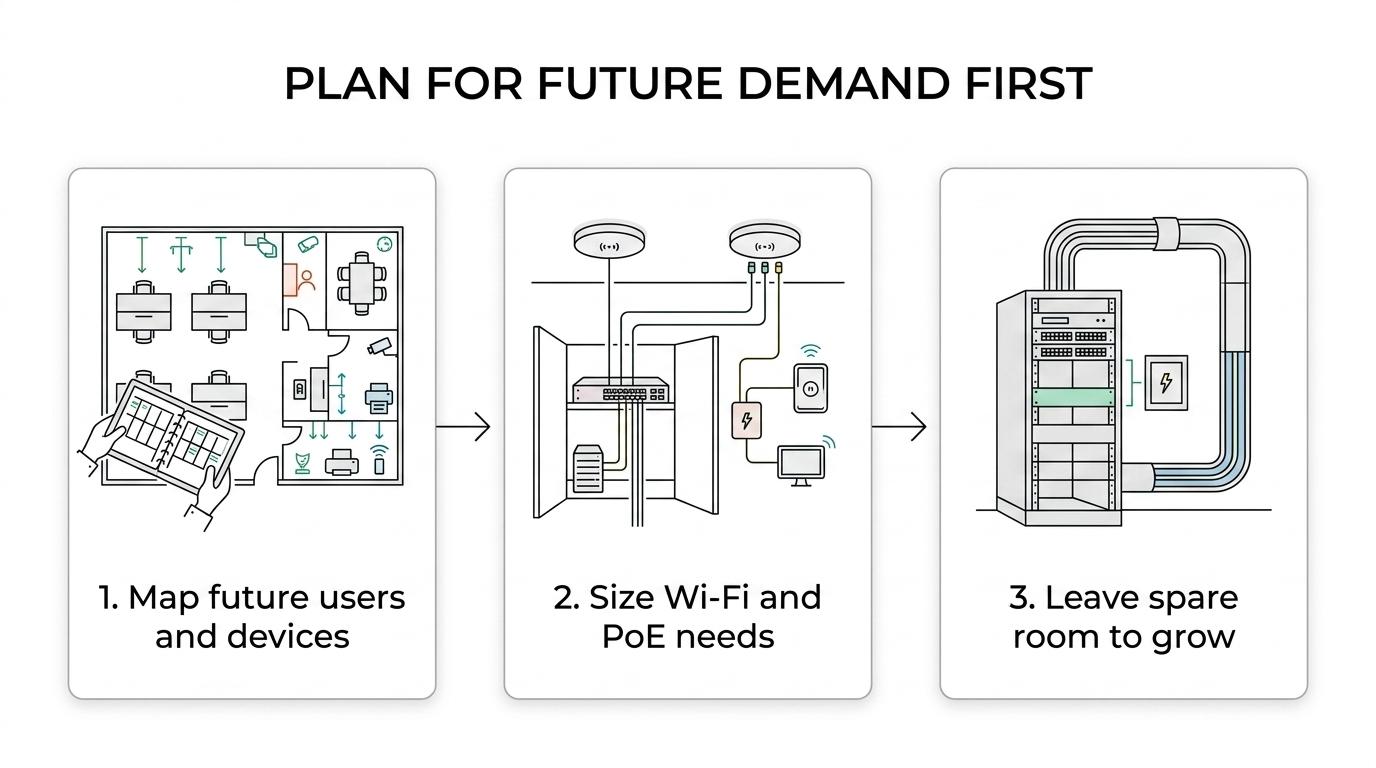
How to Plan Structured Cabling for Future Growth
A successful cabling project begins with how the space will be used—not simply where the desks are located today.
- Forecast users and devices. Estimate future employees, workstations, conference rooms, printers, cameras, badge readers, wireless access points, and other connected systems.
- Calculate network and power needs. Review bandwidth, switch ports, Power over Ethernet capacity, equipment requirements, and potential technology upgrades.
- Reserve physical space. Leave practical room in racks, telecommunications rooms, conduits, trays, and patch panels for additions and maintenance.
- Create a documentation standard. Decide how outlets, cables, ports, pathways, and equipment will be labeled and recorded.
- Test and certify the installation. Confirm that installed links meet their intended performance requirements and retain the results for future reference.
Cat6 or Cat6A: Which Is Better for an Office?
Cat6 can support many everyday office applications and may be appropriate for shorter runs, stable network requirements, and projects with moderate performance needs. It is generally smaller, easier to handle, and less expensive to install than Cat6A.
Cat6A is usually the stronger long-term choice for full-distance 10-gigabit connections, higher-performance wireless networks, and environments with demanding Power over Ethernet requirements. It requires more pathway space and careful installation, but it often provides greater flexibility for future upgrades.
The decision should not be based on speed alone. A professional assessment should consider cable distance, heat, electromagnetic interference, pathway capacity, connected devices, budget, and the expected life of the facility.
Fiber or Copper: Which Is Better for Backbone Cabling?
Most offices benefit from a combination of fiber and copper. Copper is practical for horizontal connections to computers, phones, cameras, access control devices, and wireless access points because it can carry both data and power.
Fiber is often preferred for backbone connections between telecommunications rooms, floors, buildings, or separate areas of a large facility. It supports longer distances and higher bandwidth while avoiding many electromagnetic interference concerns. Fiber can also provide a clearer upgrade path for organizations expecting significant network growth.
A common design uses fiber for the backbone and copper for connections to endpoint devices. The best combination depends on distance, bandwidth, power, building layout, and future expansion plans.
How to Audit Existing Office Cabling
An office move, renovation, or network upgrade is a good time to evaluate the existing cabling plant. Complete the audit before furniture plans and construction schedules are finalized so problems can be addressed while changes are still practical.
Start by collecting available floor plans, port records, certification reports, switch inventories, and telecommunications room layouts. Then inspect racks, patch panels, pathways, and visible cabling for missing labels, damaged components, unsupported bundles, blocked airflow, abandoned cable, and overcrowding.
Finally, test representative links and any circuits supporting critical systems. Testing should confirm performance—not only basic continuity. The assessment should consider every technology that depends on the network, including phones, video surveillance, access control, wireless access points, and managed IT services.
When Is It Time to Upgrade Structured Cabling?
An upgrade may be more cost-effective than continued repairs when:
- Network problems return after repeated service visits.
- Cable labels or documentation are missing or unreliable.
- Certification testing shows that links do not meet performance requirements.
- Racks, closets, or pathways have no practical room for expansion.
- Existing cabling cannot support a planned switch, Wi-Fi, phone, camera, or access control upgrade.
- Office changes regularly require lengthy tracing, temporary workarounds, or service interruptions.
When cabling makes routine changes difficult, it has become a business constraint. Addressing the underlying infrastructure can reduce downtime, improve network management, and prepare the office for future technology.
Frequently Asked Questions
How far ahead should an office plan its structured cabling?
A growth-ready plan should consider how the office may be used over the next three to seven years. Estimate future users, connected devices, and layout changes, then reserve practical capacity in data drops, switch ports, racks, and cable pathways.
Why does office Wi-Fi need structured cabling?
Wireless access points still need dependable wired connections, sufficient switch capacity, and appropriate power. Plan access point locations around coverage and capacity rather than cable-routing convenience, and allow for future access point upgrades and increased Power over Ethernet demand.
What records should be kept for an office cabling system?
Keep consistent labels for outlets, cables, and patch-panel ports, along with certification results, floor plans, closet layouts, and as-built documentation. Make these records accessible to authorized IT and facilities teams, and update them whenever ports are reassigned or the cabling layout changes.
Is a basic continuity test enough to assess existing office cabling?
No. A cabling assessment should confirm performance, not just basic continuity. Test representative links and circuits supporting critical systems, and retain the results. Testing and recertification can help determine whether problem links can be repaired or whether part of the system needs replacement.